Components
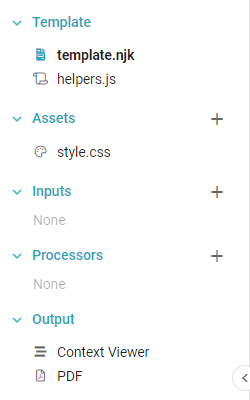
A new Informer Template comes with three default Components: template.njk, helpers.js, and style.css. These provide the base content so that creators can focus on the content design.
template.njk
Nunjucks requires a template.njk file to display output, so Informer provides a default version with each Template and prevents the editor from deleting it. It is the base HTML file that populates a Template. Web designers might compare template.njk to a typical index.html file: it is the first thing to load. Add content to template.njk to make changes to the Template. You can add other HTML files under Assets, but they only appear in the output if they are referenced in template.njk.
helpers.js
Informer also provides a helpers.js file. Use it to create custom Nunjucks filters (not the same as a Dataset Filter). Any JavaScript function written in helpers.js is available as a filter in template.njk (or any other HTML file created under Assets). Although Informer provides the file, it is blank by default.
style.css
A new Template also includes a style.css file by default, but Informer does not protect it from deletion. It is optional and can be recreated if necessary. CSS defines the style of HTML elements and is typically handled in a dedicated file. Style elements added to style.css are incorporated from the beginning, because the default template.njk already contains a reference to style.css.
Context Viewer
The Context Viewer shows the data currently stored in the context. Components can manipulate and access the context: Inputs and Processors can add or remove data, while Assets and the Template files can accept data injections from it.
PDF
The PDF component shows a PDF preview of the Template and lets you alter the page formatting. See Output for more on the PDF and the Context Viewer.