Administration
The Administration area is where a Super User configures the Informer server: system settings, who can sign in, how the product is branded, and how it is kept healthy. A left rail groups everything into a handful of sections so the right control is easy to find.
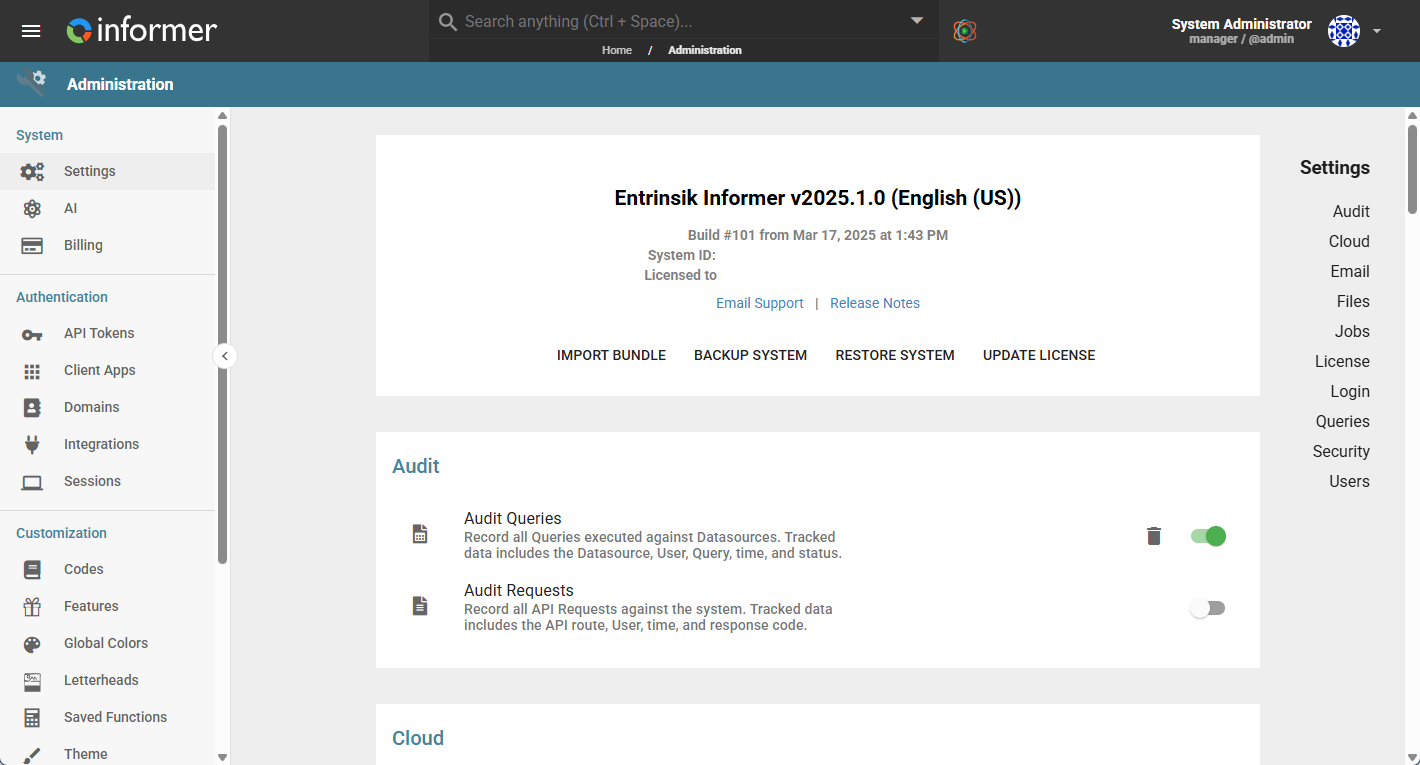
What lives in Administration
| Section | What it covers |
|---|---|
| System | The Settings landing page (build, license, and the configurable options), plus AI, Billing, email, auditing, SSH Tunnels, Search Clusters, and System Health. |
| Authentication | How people and machines get in: API Tokens, OAuth Client Apps, sign-in Domains (AD, LDAP, SAML), connected IntegrationA connection from Informer to an external service such as Google Drive, Gmail, or Salesforce, used by Apps, chats, and jobs to act on your behalf.s, and Sessions. |
| Customization | Tailoring Informer to your organization: Codes, Features, Global Colors, Letterheads, Saved Functions, Theme, and User Fields. |
| Maintenance | Keeping the server running: Job Workers, the Request and Console logs, log settings, and Bundles. |
| Multitenancy | Running multiple isolated Tenants from a single Manager Tenant. |
| Appendix | Reference topics: a common email error and how Informer cleans up ElasticSearch indices. |
Most of Administration is limited to Super Users, and some entries appear only when the matching license or deployment applies (Tenants on multi-tenant installations, Search Clusters on the home manager tenant, and so on).
In this section
| Chapter | In one line |
|---|---|
| System | The Settings landing page, AI and Billing, email, auditing, and the server-health tools. |
| Authentication | API Tokens, OAuth Client Apps, Domains and SAML single sign-on, Integrations, and Sessions. |
| Customization | Codes, Features, Global Colors, Letterheads, Saved Functions, Theme, and User Fields. |
| Maintenance | Job Workers, logs, log settings, and Bundles. |
| Multitenancy | Tenants, the Manager Tenant, and the URL strategy for accessing each Tenant. |
| Appendix | The 535 5.7.139 email error and how Informer deletes ElasticSearch indices. |
Where do I look when...
| You want to... | Where |
|---|---|
| Change a system-wide setting | System settings |
| Configure SMTP so Informer can send email | Email Server Settings |
| Set login attempts and password rules | the Login and Users sections of System settings |
| Turn on multi-factor authentication | the Security section of System settings |
| Set up single sign-on | Configuring a SAML Domain |
| Brand exports with a letterhead | Letterheads |
| Move content between instances | Bundles |
| Back up or restore the system | About, Backup, and License |
| Read the server logs | Checking Log Messages |
| Run multiple isolated Tenants | Multitenancy |
Also available through the REST API
Everything on this page is built on Informer's public REST API, the same one the product uses, so your scripts and integrations can do it too. Developer reference: Tenant.