The Home page
The Home page is where you land when you sign in to the classic Informer web interface. It lists everything you have access to, regardless of type, and is the jumping-off point to every other part of Informer.
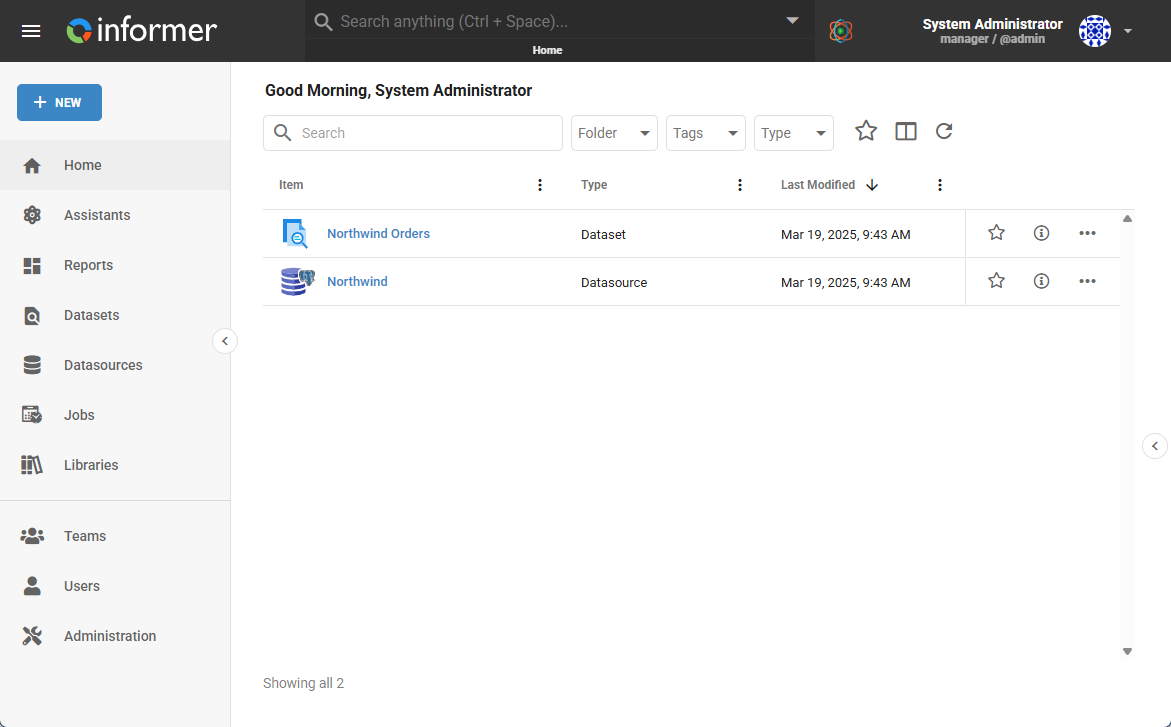
Getting around
Two things on the Home page take you everywhere else:
- The navigation rail down the left side links to each kind of content's own listing page: Reports, Datasets, Datasources, Jobs, Assistants, Libraries, Teams, Users, and Administration. The Home listing shows all of them together; each rail item narrows to one type.
- The global search bar across the top searches anything you have access to, from any page. It is the fastest way to jump straight to a specific Report, Dataset, or Job by name.
A path through Informer
If you are new, the classic getting-started path walks through the platform end to end, and each step is covered in depth in its own section:
| Step | Where |
|---|---|
| 1. Connect to your data | Connecting a Datasource |
| 2. Build a Dataset | Creating Datasets |
| 3. Build a Query | What is a Query? |
| 4. Visualize it on a dashboard | Creating a Report |
| 5. Automate and deliver it | Creating a Job |
In this section
| Article | In one line |
|---|---|
| Finding your content | Global search and the tools every listing page shares. |
| News and Visuals | The Home page's activity feed and your pinned Visuals. |
| Comments | Leave context and instructions on Reports, Datasets, and other objects. |
Where do I look when...
| You want to... | Where |
|---|---|
| Jump to something by name | the global search bar |
| See only one kind of content | that type's item in the navigation rail |
| Narrow a long list | Finding your content |
| Catch up on recent activity | News and Visuals |
| Leave a note on an object | Comments |
| Start from scratch | the getting-started path above |