Assets
Assets are a type of Component within Templates. Any file used by a Template, except the template.njk and helpers.js files, is considered an Asset. To add an Asset, click the plus sign and select the desired Asset type.
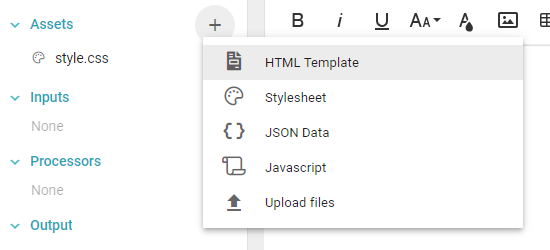
- HTML Template: additional HTML templates hold pieces or blocks of HTML instead of a full document. Insert them in
template.njkwith Nunjucks' include tag. Organizing the Template with concise HTML Templates instead of a single largetemplate.njkis recommended. - Stylesheet: CSS files that define the styling for HTML elements. Informer includes one by default:
style.css. - JSON Data: the best way to include static data that does not come from within Informer. If the data changes in the future, importing it into Informer and adding it to the Template as a Processor is recommended.
- JavaScript: use JavaScript files to manipulate HTML.
- Upload Files: upload other types of files the Template might use. The most common example is an image file, such as a logo. Only certain file types are allowed; the upload window restricts available files to the allowed types.
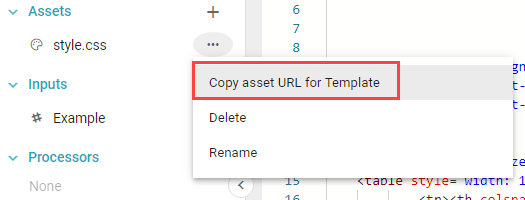
After creating an Asset, refer to it within a Nunjucks tag in an HTML Template or template.njk. Alternatively, click the three dots next to the Asset and choose Copy asset URL for template, then paste that URL into template.njk or another HTML Template file.
Also available through the REST API
Everything on this page is built on Informer's public REST API, the same one the product uses, so your scripts and integrations can do it too. Developer reference: Reports.