Integrations
Integrations enable Informer to connect to external platforms or services using OAuth. Informer acts as the client, securely interacting with third-party services to exchange data using user-granted permissions. This ensures users can interact with external services without sharing their login credentials directly, enhancing security and user experience.
Super Users access Integrations from the Administration page by clicking Integrations in the left-hand menu under the Authentication heading.
Creating a new Integration
Set up a new Integration by clicking the New Integration button. This opens a form where you fill in details such as Name, Category, Client ID, Client Secret, and other OAuth-specific fields.
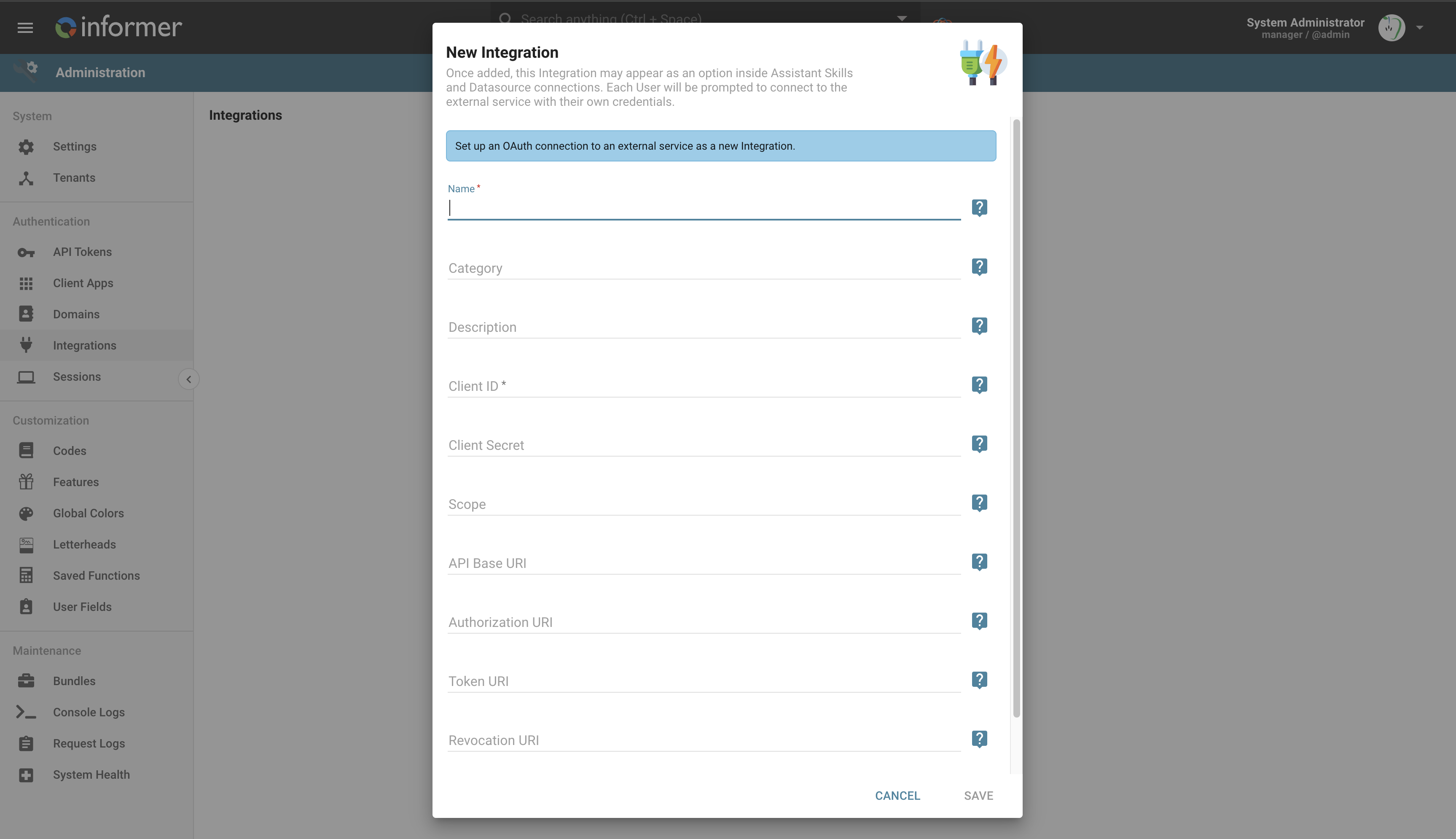
Each field in the form serves a specific purpose to ensure a secure, functional connection to the external service:
- Client ID: A unique identifier provided by the external service during the OAuth registration process. It identifies your application to the external service.
- Client Secret: A confidential key provided along with the Client ID. The external service uses it to verify the authenticity of the client and ensure requests come from a trusted source.
- Scope: Defines the level of access being requested, specifying what resources or actions Informer can perform on the external service (for example, read-only access or permission to create and modify resources).
- API Base URI: The base URI for the external service's API: the root endpoint where Informer sends API requests once authorized.
- Authorization URI: The endpoint where users are redirected to grant access. This initiates the OAuth flow, typically taking the user to a login or consent screen.
- Token URI: After authorization, the endpoint where Informer exchanges the authorization code for an access token. The token authenticates subsequent requests.
- Revocation URI: The endpoint used to revoke access tokens when the user or application disconnects the integration, ensuring no further requests can be made.
- Basic Token Auth: Determines whether to use basic token authentication during the OAuth process. Basic authentication encodes the Client ID and Client Secret as a header, and may be required by some services during token exchanges or API calls.
Where you might find this information
To connect to an external service, the required OAuth information is typically found within the service's developer portal or API documentation. Most services that support OAuth provide a section for creating or registering an OAuth application, where you receive the Client ID and Client Secret. The Authorization URI, Token URI, and Revocation URI are usually specified in the OAuth or API documentation under authentication or security sections.
The Scope is often customizable based on the API's permissions model, and the available scopes are listed in the documentation. The API Base URI is also typically provided in the API documentation. For services requiring Basic Token Auth, this is specified in the authentication details provided by the service.
Integration details
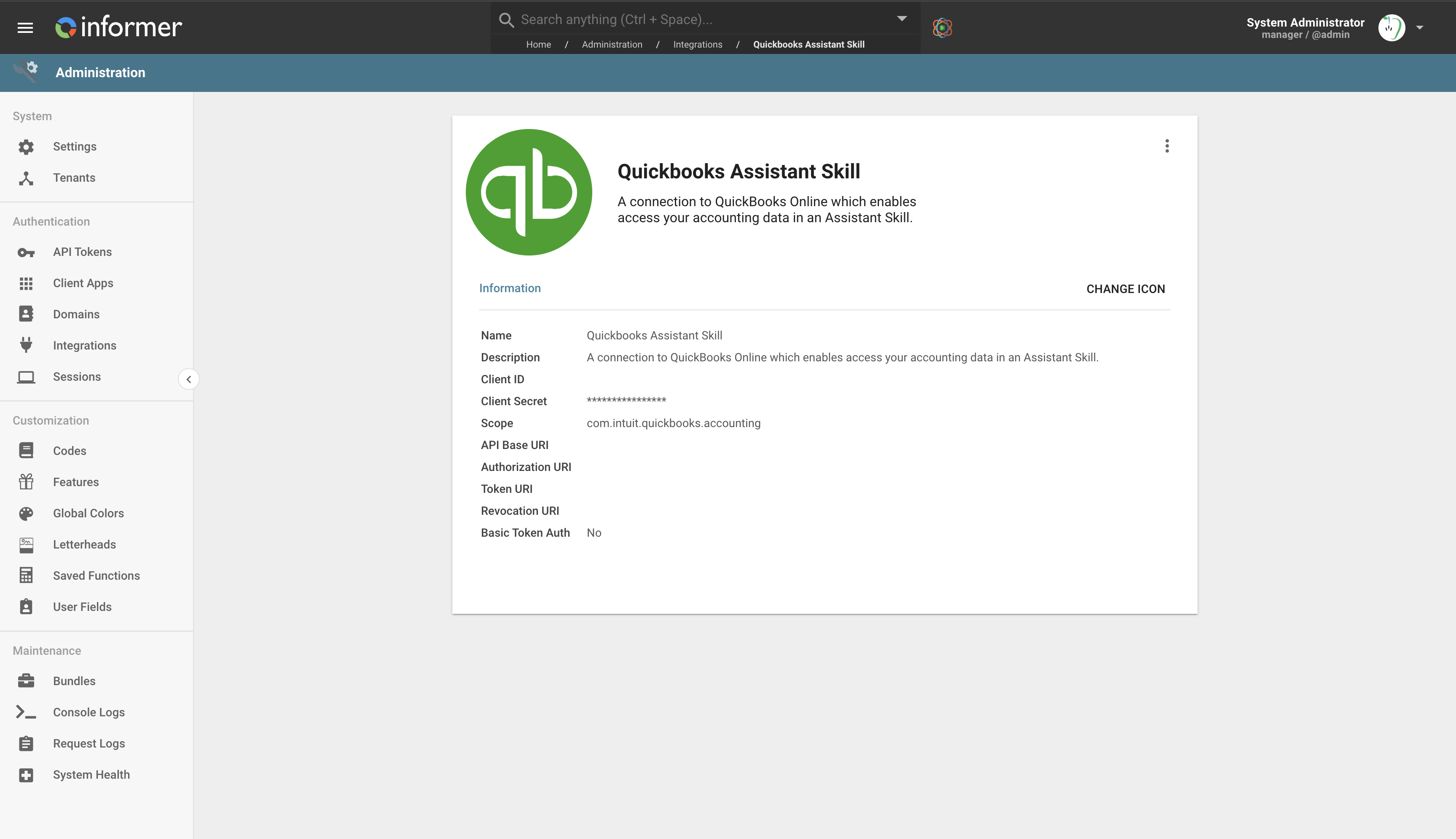
Once an Integration is configured, the details can be viewed and edited through the Integration's detail page, where the icon and other connection details can be updated.
How users connect
Different features within Informer, such as AI Assistants, may prompt users to establish these Integrations. Once connected, users can view their active Integrations on their profile page, where they can manage or disconnect them at any time. This ensures users have control over their connected services and can revoke access whenever needed.
Where to use Integrations in Informer
Integrations open up many possibilities, with one primary current use being the connection to AI Assistants. By integrating external services, Informer lets AI Assistants securely make API requests on behalf of the user, providing enhanced automation. For example:
- An AI Assistant could connect to a CRM system to retrieve and update customer data in real time based on user commands.
- An AI Assistant could integrate with a calendar service to schedule events and retrieve availability without direct user intervention.
These Integrations ensure that Informer can interact with external systems in a secure, user-authorized way, extending its capabilities and automating complex workflows.