System Audit
System Audit is a way to monitor system resources and keep Informer running efficiently. Who is using Informer, and how? How fast are Queries running? What content is not being used? This information is readily available to administrators through System Audits.
For example, you can see how Users are using Informer, optimize slow-running Queries across the system, and clean out unused content.
Enabling System Audit
It is recommended to create an Informer Datasource first before enabling System Audit features. See Creating an Informer Datasource.
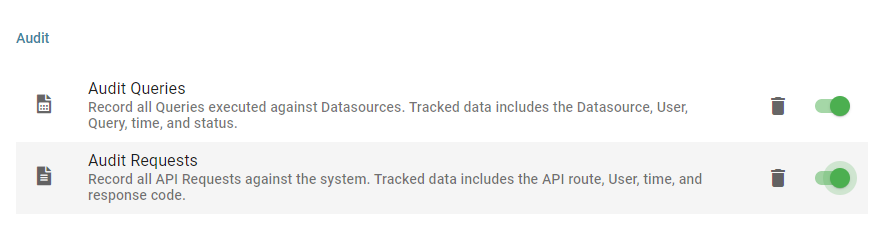
Audit Queries
The Audit Queries option records all Queries executed against Datasources. The tracked data includes the Datasource, User, Query, time, and status. This lets administrators track which parts of Informer are used the most often, and when and who is using which parts.
Audit Requests
Audit Requests records all API Requests against the system. The tracked data includes the API route, User, time, and response code. This audit is most useful to administrators who want to keep Informer running at peak performance by seeing where and when things may be slowing down. Informer already records much of this data in logs; this option allows for larger records and the ability to report on the data like any other Dataset in Informer.
It is recommended that this option is left off by default, as leaving it running generates large amounts of data that is stored in Informer.
Clearing audit history
System Audits generate additional data that is stored in Informer and should be cleared periodically. To clear an Audit's history:
- Navigate to the Audit section of Settings in Administration, as described in Enabling System Audit.
- Click the trash can icon on the row of the type of Audit that needs to be cleared.
Note: Clearing an Audit's history erases all of its Audit data, and the data is irretrievable.