Datasource Field options
Each Field in a Datasource Mapping has options that control how it appears and behaves. The options are the same across Datasource kinds, with two exceptions: U2 Datasource Fields have extra options, and Web Datasources have no Fields to edit.
Editing a Field
- From the Datasource listing page, open the Datasource.
- Click Mappings in the left menu.
- Open the Mapping that contains the Field.
- Double-click the Field to open the Edit Field window.
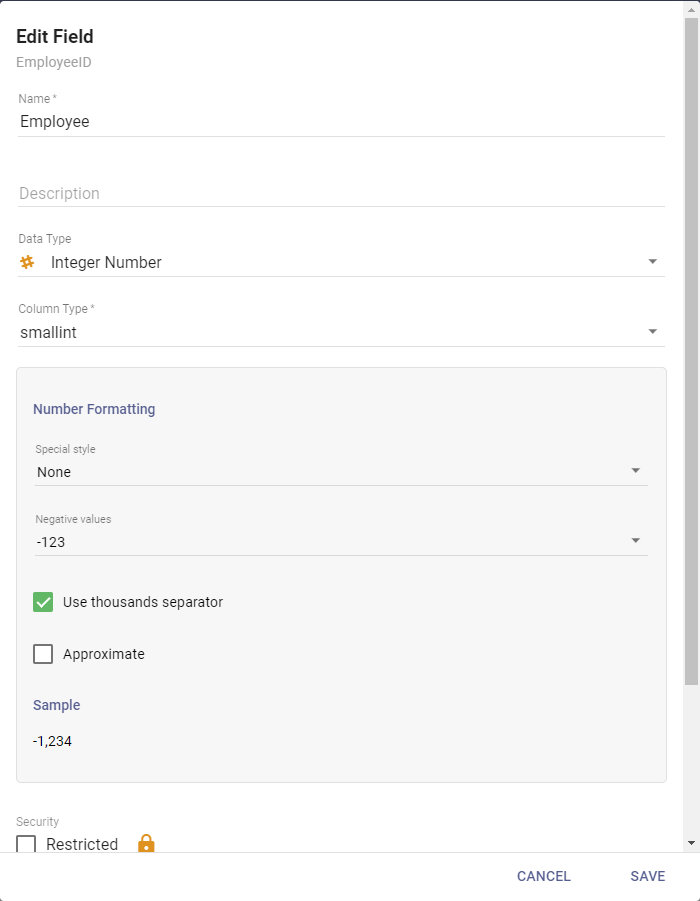
The available options depend on the Field's data type:
-
Name: the Field's name as it appears in the Mapping's column. This does not change the alias.
-
Description: an optional description of the data in the Field.
-
Data Type: the default data type for the Field in new Queries. It affects how the Field behaves as a Query output and how its values are stored in Elasticsearch:
Data Type What it is Text A string filterable by word. Searching Worldmatches a value ofHello World.Keyword A string matched only in full. Searching Worlddoes not matchHello World, butHello Worlddoes.Full Text Not filterable, groupable, or sortable. Use only for potentially long content like comments or email bodies. Decimal Number Exact numeric values with a set number of decimal places. Integer Number Values between +/- 2^31, truncating decimals without rounding. Date A date and time with configurable display formatting. Timestamp A date and time formatted only as YYYY-MM-DD HH:MM:SS(for example2020-03-11 13:45:30).Time A time of day in hours, minutes, and seconds. Boolean True or false. Location An object with latandlongproperties, used to power the Google Maps visual when that feature is enabled.Object JSON objects. Immense Term errorsIf a Query runs and some rows fail to index with an "Immense Term" error, a Field is too large for its data type and should be Full Text.
-
Column Type: the specific SQL data type (not available on U2 Datasources).
-
Formatting: sets exactly how the data appears. Not all data types have formatting options.
-
Security: toggles whether the Field is restricted. See Mapping Sets and restricted Fields.
-
Field Set: adds the Field to a Field Set, or creates one. See Field Sets.
-
Codes: if the Field is a code in a code/description pairing, assign it a Code so descriptions show in Datasets and Ad Hoc Queries. Codes are set up under Administration.
Click Save when done.
U2 options
U2 Datasource Fields share most options with other kinds, but have no Column Type (U2 uses different data types than SQL) and add some U2-specific options:
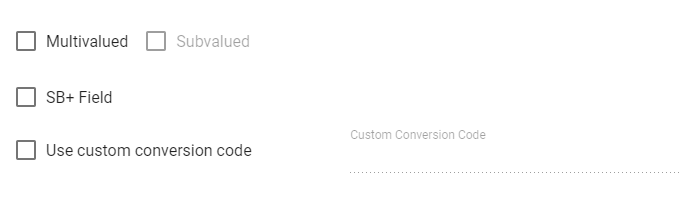
- Multivalued: whether the Field holds multiple values within a single attribute of a record (an array or list, typically delimited by a special character).
- Subvalued: whether a multivalued Field's values are further structured into subvalues.
- SB+ Field: whether the Field uses SystemBuilder Plus (SB+), an application environment for multivalue databases.
- Use custom conversion code: sets the conversion code that formats the Field's final output.