Audit logs
With Audit Logs, you can take the data Informer's logs produce and use Informer to create Reports or Queries from it, like any other data, all within your instance. For example, you can create Visuals showing which Datasets are used the most and when they are queried.
Creating a Dataset from an audit log
Before using Audit Logs for reporting, you must create an Informer Datasource. See Creating an Informer Datasource.
The System Audit feature stores the data it records in a schema called Audit on the Informer Datasource. After enabling System Audits, the data Informer collects is available to make Datasets. Create a Dataset from either the Query Audit or the Requests Audit data:
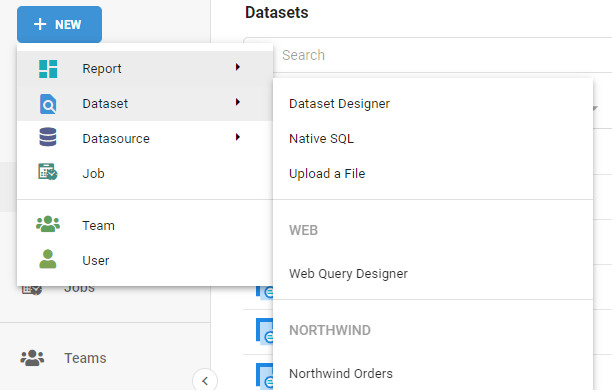
- Click the New button.
- Select New Dataset, then Dataset Designer.
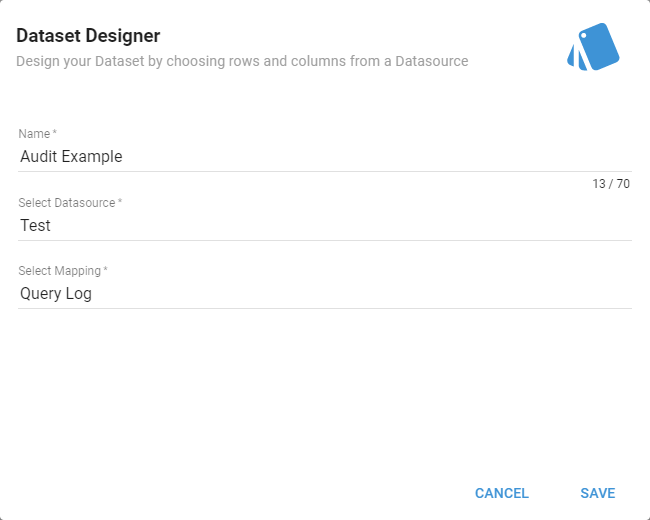
- Enter a name for the new Dataset.
- Select an Informer Datasource under Select Datasource.
- In Mappings, locate Query Log or Request Log depending on the data you want, and click Save.
After creating the Dataset, use the audit logs to generate Reports or run Queries against it, like any other Dataset. See Creating a Dataset for more on Dataset behavior.
When making a Dataset for Query Logs, the recommendation is to deselect the Payload and Payload Text Fields unless the Dataset needs them. These Fields produce large strings of data that can make the Dataset difficult to understand.