Limits and running out
Several independent limits sit between a request and the shared Credit poolYour organization’s shared balance of unexpired credits. Everything billable draws from the one pool, and spending always burns the oldest-expiring grant first.: some protect people from each other, some protect the pool from a single runaway App, and one is the pool itself. This page walks the checks in the order they fire, the warnings that appear before anything blocks, and what to do when something is refused.
What can stop a request
A request is checked against these limits in order. The first one that fails is the one that stops it, and each produces a different message, so the message on screen tells you which layer you hit.
- Is AI set up at all?
Without a working license and subscription, AI features show Unlock AI in Informer rather than an error. If your organization already subscribes and this appears anyway, see the license server section below.
- Is the model tier allowed?
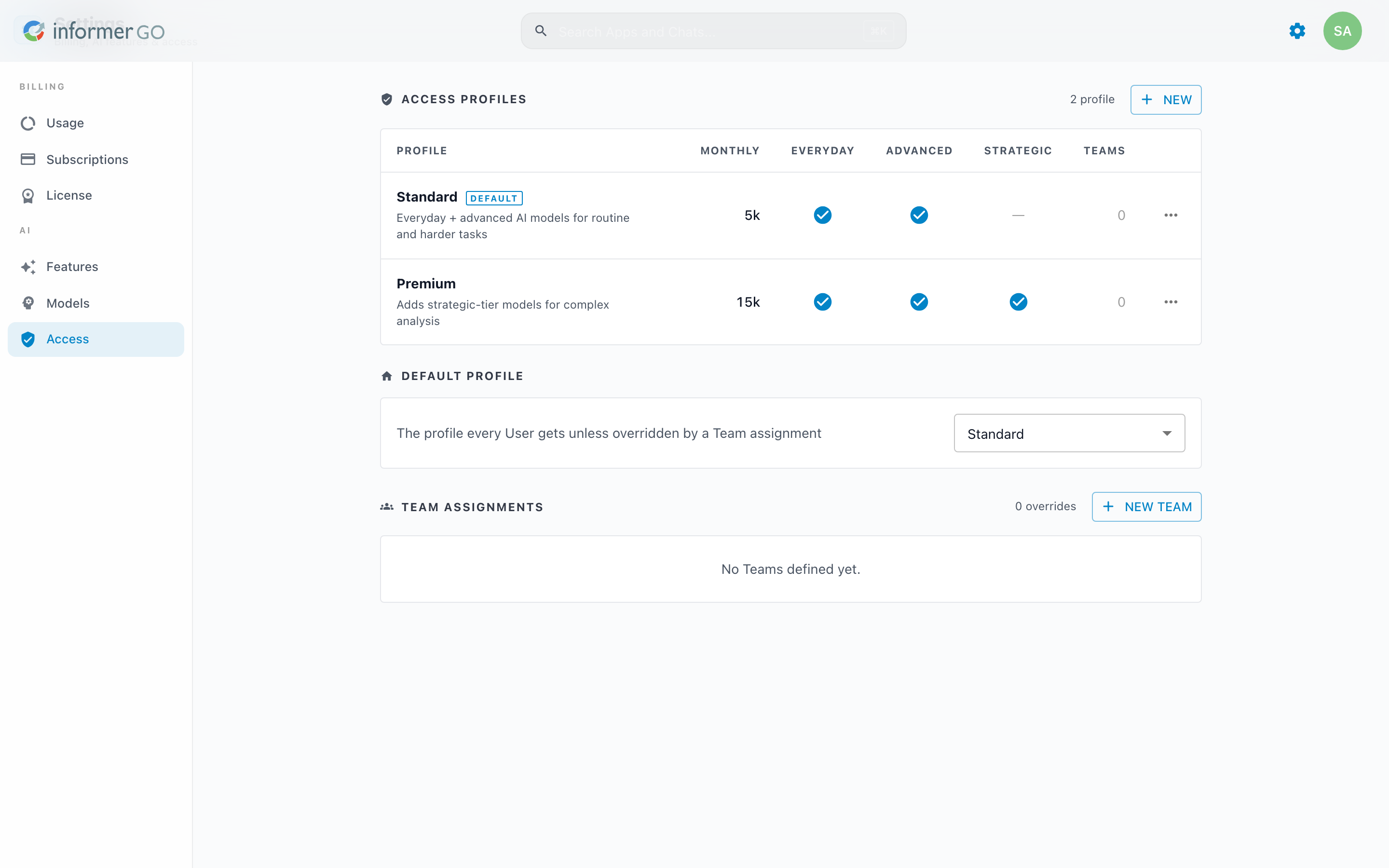
The User's Access profileA named set of AI limits: a monthly credit cap plus the model tiers it allows. Profiles are assigned to Teams, with one system-wide default for everyone else. lists which tiers it may use. A tier the profile does not allow is simply unavailable in the model picker. Set on the Access page.
- Is the User within their monthly cap?
An access profile can carry a monthly AI credit cap. Only AI usage counts toward it, not the compute charged to the User for Jobs and Apps. Reaching it shows You hit this cycle’s limit, and it resets at the start of the next cycle. A cap of
0grants no monthly credits, so a profile set that way is stopped here on its first request. This is a per-User ceiling, not a shared one, so one heavy User cannot exhaust everyone else's allowance. - Is the App or Dataset within its budget?
An entity budget caps the monthly credit spend of a single App or Dataset, independent of any User's cap. Budgets are set through the API and appear, with their status, on the System Usage page in Administration.
- Does the pool have credits left?
The last check. An empty pool shows Time to top up, and it affects everyone at once.
The layering is the useful part. A per-User cap protects the pool from a single User running up AI usage, an entity budget protects it from a single runaway App, and the pool balance is the backstop for the organization. Each can be adjusted without touching the others.
The warnings before the wall
Running out is disruptive, so Informer warns ahead of it on two channels:
- In-app banners appear for billing admins in the classic interface and in Informer GO once the pool reaches the lowest percentage switched on under Usage Alerts, and always when paid credits run out. They range from "% of credits used this cycle" through "You're out of paid credits and currently running on the safety buffer. Add credits to avoid disruption." to "Credits exhausted — premium features will be disabled until credits are added." Each carries a purchase shortcut.
- Usage Alert emails fire at 80% used, 90% used, 95% used, and Credits exhausted. All four are on by default; add recipients on the Subscriptions page. With no recipients configured, the in-app banners still show.
To find what is consuming the pool before it empties, the Usage page's Top Consumers ranks Apps and Users over 7, 30, or 90 days, and Monthly Trend separates a genuine growth curve from a one-off spike.
When credits do not apply
Two license arrangements change the picture:
- Bring Your Own Key (BYOK) spares AI calls only: they bill your provider account, so the per-User cap and pool checks skip them, though tier restrictions still apply. Compute and storage in Informer Cloud still draw credits. See Buying credits.
- Enterprise mode draws from no pool at all. Usage is still tracked for visibility, and no credit limit can block work.
And on your own hardware, compute, storage, and agent runs never draw credits in the first place; only AI does. See How credits are spent.
When Informer cannot reach the license server
The pool balance lives on Entrinsik's license server, so Informer needs outbound access to it (api.informer.cloud). When the connection drops:
- Informer keeps working on the last known balance for a grace period, then blocks AI with AI is temporarily paused until the connection is restored. Your subscription is unaffected.
- The Usage page shows a banner once the sync has been failing for a while: "License server unreachable" while retries continue, or "Balance may be out of date" when the last good sync is old enough to matter.
Opening the Usage page re-syncs automatically, so the fastest check is simply loading it and seeing whether a banner appears.
Troubleshooting
- "Time to top up": the shared pool is empty and every User is affected. Add credits from Subscriptions, or turn on auto-replenish so this does not recur.
- "You hit this cycle’s limit": this User reached their access profile's monthly cap while the pool still has credits. Raise the cap, move the User to a different profile, or wait for the cycle to reset. See Access.
- A model is missing from the picker: the User's profile does not allow that tier. A User on several Teams gets the most permissive combination of their profiles, so check all of them.
- "AI is temporarily paused": the license server cannot be reached; see the section above.
- "Set your API key": your license uses your own provider keys and none is set. Add it under Models; no credits are needed.
- An App stopped mid-month while the pool has credits: check its entity budget on the System Usage page in Administration. A budget verdict blocks only that App.