Assistant Usage
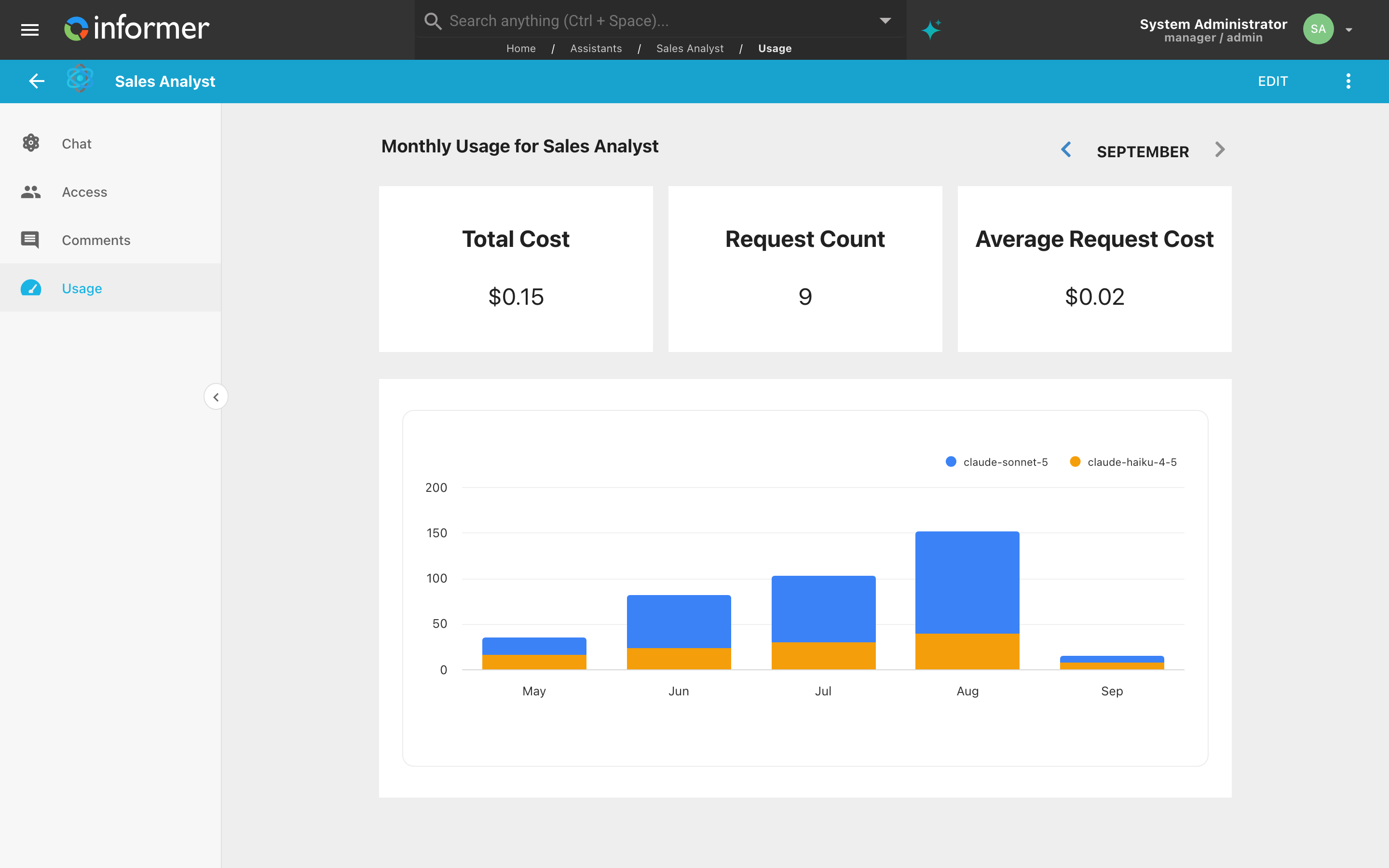
An Assistant's Usage page shows what it is costing: how many AI requests it handled in a month, what they cost, and how that spend has trended across models. Open the Assistant and click Usage in its left rail.
Who sees it
Usage appears in the rail only for people who can edit the Assistant. Everyone else can chat with it without seeing what it costs, and a direct link to the page is refused.
The month in view
The heading reads Monthly Usage for the Assistant, and the month picker beside it opens on the current month. Previous Month and Next Month step through history; Next Month is disabled once you are back on the current month, and the label adds the year for months outside the current one.
The three cards are for the month shown:
- Total Cost: what the Assistant's AI requests cost that month, in dollars.
- Request Count: how many AI requests it made.
- Average Request Cost: the first divided by the second.
A request counts toward the Assistant whenever it answers, including in the editor's live preview while someone is editing a draft, so trying out an Assistant shows up here too.
The trend
Below the cards, a column chart covers the last twelve months: one column per month with activity, stacked by model, so you can see both how much the Assistant is used and which models carry the load. The values are credits, the unit your organization's credit pool is charged in, rather than dollars; hover a column for each model's figure. An Assistant that has not been used yet has an empty chart.
Usage across the system
This page is one Assistant's slice. For everything that draws on your credits, Assistants included, use Usage in Settings: the pool balance, this month's spend by category, and the monthly history. See Usage and How credits are spent.
Troubleshooting
- The cards read zero, but people are using the Assistant. Check the month picker; it may have been stepped back to an earlier month.
- Usage is not in the rail. You can chat with the Assistant but not edit it. Ask its owner.