Increasing Informer memory allocation
With the Informer Load Balancer, work is spread across multiple threads, each responsible for a set of tasks. If performance degrades for a thread, it may be time to give it more memory. These steps raise the limit for a specific thread, on Windows and on Docker. For Elasticsearch's memory, see Elasticsearch 7 & 8 on Windows memory configuration or Elasticsearch volume and memory (Docker).
This uses the Node.js max-old-space-size property, which limits only the Old Space in the V8 heap, one of several memory types. Other memory types may exceed this value. For background, see the Node.js memory documentation.
Windows, Informer Setup
On a server built by the Informer Setup wizard, memory is set per thread type in the Performance section of the Configuration screen. The section has a row for each thread type (API, Query, Schedule, and the Load balancer). Choose Set memory limits to add the Heap (MB) and Restart (MB) columns beside Threads. The columns stay visible whenever a value is set.
- Heap (MB) sets
--max-old-space-sizefor that row's threads. Left at Not set, Node's own default applies. - Restart (MB) restarts a thread whose memory use passes that many megabytes, like PM2's
max_memory_restart. This is the thread's total memory, which is more than its heap, so set it above Heap (MB). Memory is checked every 30 seconds. Threads over the limit are restarted one at a time: each replacement starts first, and the old thread stops once the replacement is listening or after 3 seconds, whichever comes first. A thread that does not stop within about 1.6 seconds is ended. The next thread waits until that replacement is listening, or up to a minute if it does not start, so a role whose threads take longer than a minute to start can have more than one restarting at once. A role with a single thread can be briefly unavailable while its replacement starts. Left at Not set, threads are never restarted for memory.
If the limit is below what a thread needs just to run, its threads would restart forever. When a thread has been restarted for memory 3 times in a row, each within 5 minutes of starting, and passes the limit that quickly again, Informer stops enforcing the limit for that thread and writes a line to its log saying so, repeated every hour while the thread stays over the limit. The other threads are still restarted for memory. Raise Restart (MB) in Informer Setup so the limit holds again. Likewise, if a replacement stops within 3 seconds of starting, before it listens, the old thread keeps running; after 3 such failures in a row, that thread is no longer restarted for memory. Either way, the limit applies to that thread again once it crashes and restarts, or when the Informer service restarts.
In this example, the query threads get 2 GB of heap and restart at 2500 MB: in the Query row, enter 2048 under Heap (MB) and 2500 under Restart (MB).
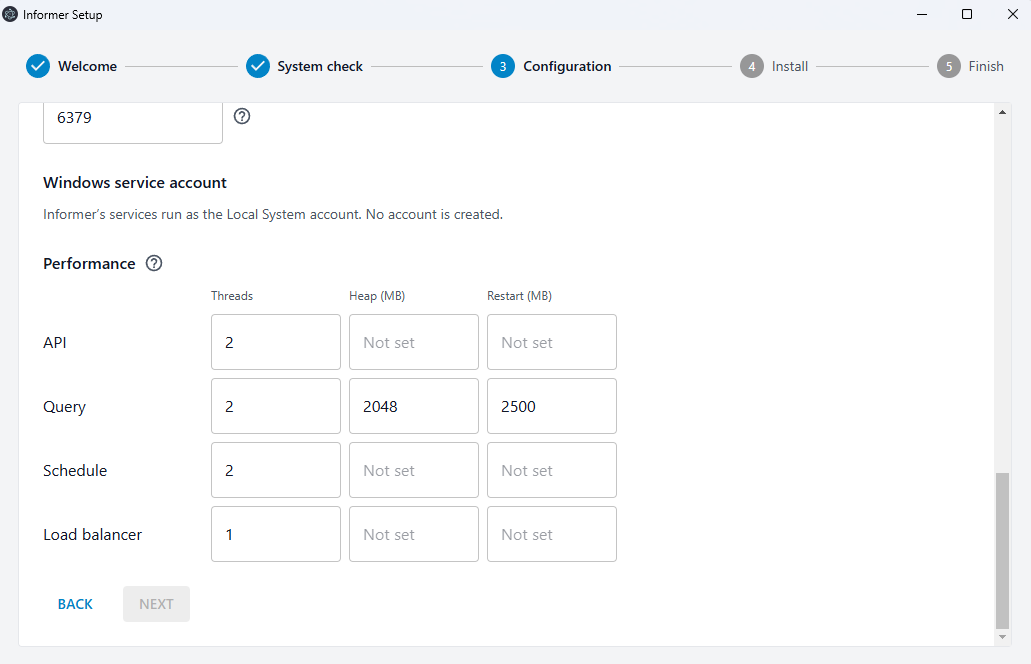
To change these later, run Informer Setup again. It reads the current values from the installed service and fills them in, so only the fields you change are different when you finish.
A server migrated from the older console installer starts with the values its service.config.json had: each thread's --max-old-space-size from node_args and its max_memory_restart. A server that ran schedules on its query threads shows a Query and schedule row instead of separate Query and Schedule rows, and a server that ran Informer as a single application without the Load Balancer shows only an Informer row. See Upgrading Informer (Windows).
Windows, older console installer
By default, each thread can use up to 1 GB of RAM. Edit service.config.json and add --max-old-space-size=nnn (where nnn is megabytes) to the node_args of the thread that needs more memory. In this example, the query threads are set to 2 GB:
{
  "name": "Informer5-query",
  "script": "node_modules/@entrinsik/informer-server/index.js",
  "instances": 2,
  "args": "--http 3002 --schedule.enabled false",
  "node_args": "--max-old-space-size=2048"
}
PM2 can also restart a thread automatically when its memory passes a threshold, which prevents a thread from locking up when it maxes out. Add max_memory_restart to the matching thread. In this example, the query threads restart at 2500 MB:
{
  "name": "Informer5-query",
  "script": "node_modules/@entrinsik/informer-server/index.js",
  "instances": 2,
  "args": "--http 3002 --schedule.enabled false",
  "node_args": "--max-old-space-size=2048",
  "max_memory_restart": "2500M"
}
Docker
Run these from the instance directory that has the docker-compose.yml, with the Informer containers stopped. Edit the entrypoint of the container that needs more memory. In this example, informer-api is raised to 2 GB with a 2500 MB restart threshold:
informer-api:
  image: docker.entrinsik.com:5000/informer:target
  working_dir: /informer
  entrypoint: "/bin/sh -c 'node dockerpreboot.js && exec pm2 start node_modules/@entrinsik/informer-server/index.js -i 2 --node-args=\"--max-old-space-size=2048\" --max-memory-restart 2500M --name informer --kill-timeout 40000 --no-daemon'"