How to calculate a sum total aggregate via a Power Script
One common use for Power Scripts is calculating a total for a specific Field across all records in a result set. To do it, use the reserved $local variable, which keeps its values across multiple records (see Reserved Power Script variables). Because $local is an object, you can create properties on it to store values.
The main steps for calculating a total across all records are:
- Initialize: use a Power Script Flow Step to create a property on
$localand add to it as the script runs through the records. - Finalize: use a Flush Flow Step so the first Power Script finishes running for every record in the result set.
- Utilize: use a second Power Script Flow Step to read the finished total.
Step 1: Initialize and increment the aggregate
if (!($local['runningTotal'])) {
    $local['runningTotal'] = 0; // Initialize running total
}

$local['runningTotal'] += $record['someNumericField']; // Accumulate value
Replace someNumericField with the alias of the Field to total.
- The
runningTotalproperty is set to zero if it does not have a value yet. - The
runningTotalproperty then grows by the value ofsomeNumericFieldfrom each record.
The same Power Script code runs for each record of the result set. If you stored the running total in a regular variable instead of $local, it would start over at zero on every row.
Step 2: Finalize the aggregate with a Flush Flow Step
After the first Power Script, add a Flush Flow Step. Flush makes every earlier Power Script run against all records of the result set before any later Flow Step starts, so the final value of runningTotal holds the sum from every record.
Step 3: Use the finalized aggregate
Because $local persists across Power Script Flow Steps, a second Power Script placed after the Flush can read $local['runningTotal'] and write it to a new Field:
$record['grandTotal'] = $local['runningTotal'];
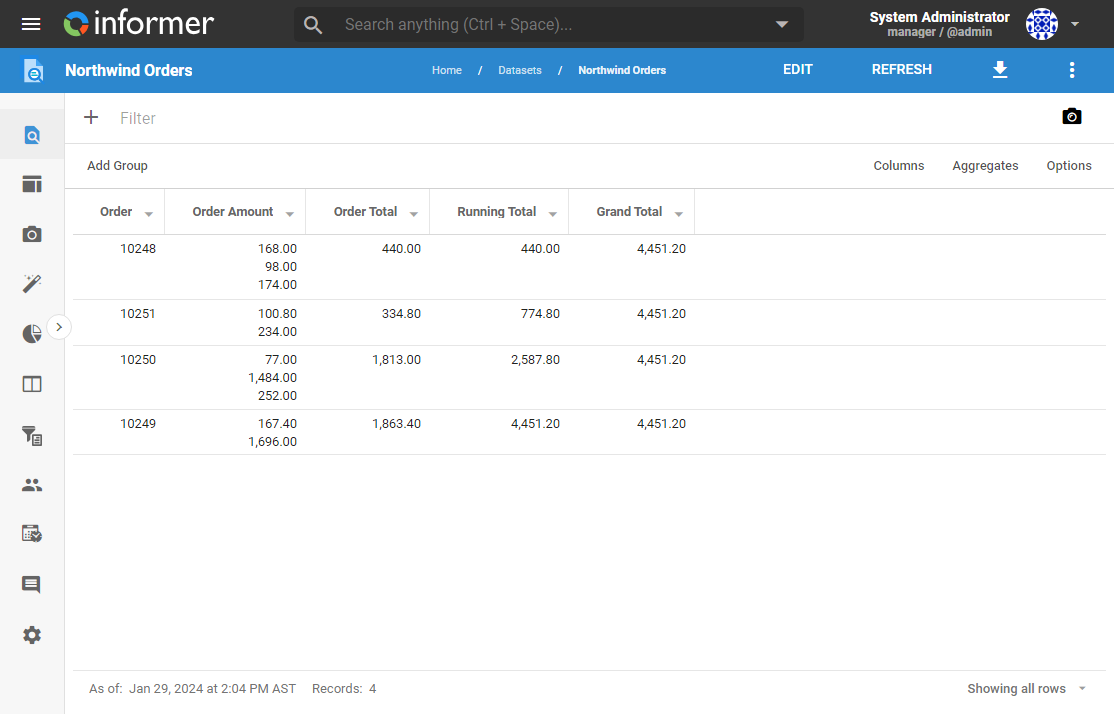
Here is the result of writing out the grand total of an Order Total Field. Every row carries the same Grand Total, while Running Total shows the total growing row by row:
To keep a separate total for each group of records instead of one overall total, see How to aggregate values on specific groups of data.